TECH
Your Phone Has a Hidden Tracking System: How Bluetooth Trackers Can Help You Find Lost Items — and How to Detect Misuse
Losing your house keys, wallet or travel bag can turn an ordinary day into a stressful experience. Bluetooth tracking devices offer a convenient solution by helping you locate everyday belongings through your smartphone.
These small devices can be attached to keychains, placed inside bags or kept with luggage. Some can show their last known location, while compatible tracking networks can help locate them even when they are far away from their owner.
However, the same technology has a privacy concern: a tracking device placed inside someone's belongings without permission could be misused to monitor their movements.
Understanding how Bluetooth trackers work can help you use them effectively while protecting your personal safety.
What Is a Bluetooth Tracker?
A Bluetooth tracker is a small electronic device designed to help locate items such as keys, backpacks, wallets and suitcases.
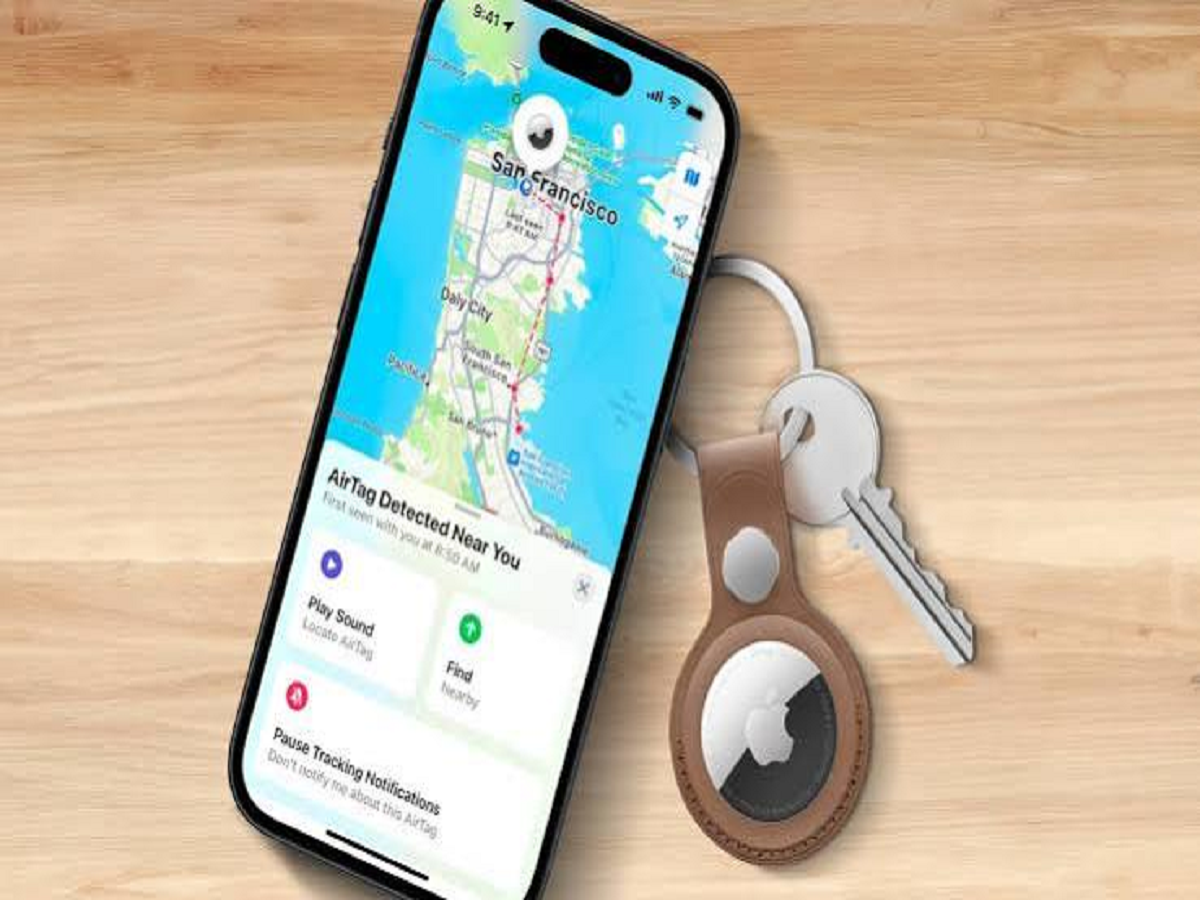
Popular examples include Apple AirTag and Bluetooth trackers compatible with Google's Find Hub network. These devices communicate with nearby compatible phones or other devices, depending on the product and its supported network.
A tracker typically does not need its own conventional mobile data connection. Instead, it uses Bluetooth signals and, where supported, a wider network of participating devices to help report its location.
The exact capabilities depend on the tracker model, smartphone compatibility and the available tracking network.
How Does the Technology Work?
The process is relatively simple.
First, you attach the tracker to an item and pair it with a compatible application. If the item goes missing, you can use the application to check its available location information.
When the tracker is nearby, some models allow you to make it play a sound. Certain compatible devices also support more precise nearby finding using technologies such as Ultra Wideband.
If the item is far away, a supported finding network may help report the tracker’s approximate location when it comes within range of participating devices.
However, location updates are not always immediate. They depend on the device, battery condition, connectivity and surrounding environment.
Five Useful Ways to Use a Bluetooth Tracker
1. Find Lost Keys
Attach a tracker to your keychain so you can check its location through your phone. If it is nearby and the device supports sound alerts, you may be able to make it ring.
2. Keep Track of Luggage
A tracker inside your suitcase can help you check its last reported location if your luggage becomes misplaced during travel.
It cannot guarantee that an airline or transport company will recover your bag, but the location information may help you explain where it was last detected.
3. Locate Your Backpack
Students and office workers can use trackers to help locate backpacks, laptop bags and other frequently misplaced belongings.
Choose a secure attachment point so the tracker does not easily fall off.
4. Find Frequently Misplaced Items at Home
Trackers can be useful for items such as camera bags, equipment cases or other belongings that are regularly moved between rooms or locations.
5. Reduce Travel Stress
When travelling, a tracker can provide an additional way to check the last reported location of important luggage or belongings. It should complement, rather than replace, ordinary precautions such as keeping valuables secure.
Can Someone Use a Tracker to Follow You?
Unfortunately, tracking technology can be misused. Someone could place a compatible tracker in another person's bag or vehicle without permission.
To reduce this risk, some tracking ecosystems offer unwanted-tracker alerts. Compatible smartphones may warn users when a tracker associated with another person appears to be travelling with them.
The availability and behaviour of these alerts depend on the phone, operating system, tracker and network.
What Should You Do If You Receive an Unknown Tracker Alert?
Do not panic, but do take the notification seriously.
Step 1: Read the alert carefully. Open the notification and follow the instructions provided by your phone's operating system.
Step 2: Check the information available. Some systems can help you identify the tracker or play a sound to make it easier to locate.
Step 3: Look for the device safely. Check your belongings and nearby surroundings if it is safe to do so. An alert does not automatically prove that someone is deliberately tracking you.
Step 4: Prioritise personal safety. If you believe someone is monitoring you or you feel threatened, move to a safe, public location and contact someone you trust.
Step 5: Seek assistance if necessary. If you find a suspicious tracker or believe you are being stalked, consider contacting local law enforcement. Follow the device's safety instructions before disabling it, because some identifying information may be useful when reporting the incident.
Avoid confronting a person you suspect of tracking you if doing so could put you at risk.
Does a Bluetooth Tracker Need Internet Access?
Not necessarily. Many trackers communicate locally through Bluetooth. However, reporting a remote location usually depends on a connected phone or a participating finding network that can relay the information.
This means a tracker may not update its location if there are no compatible devices nearby, its battery is depleted or the surrounding conditions interfere with communication.
Before buying one, check its supported operating systems, network coverage, battery life and whether particular features require a compatible phone.
Are Bluetooth Trackers Better Than GPS Trackers?
The two technologies serve different purposes.
Bluetooth trackers are generally designed for small personal belongings and often rely on nearby devices to report location information. Dedicated GPS trackers use satellite positioning and may also need a cellular connection to transmit their location remotely.
GPS trackers can be more suitable for certain vehicle or asset-tracking applications, while Bluetooth trackers are often more convenient for keys, wallets and luggage.
Neither option guarantees continuous location updates in every environment.
The Bottom Line
Bluetooth tracking devices can make everyday life easier by helping people locate misplaced belongings. Their usefulness depends on compatibility, battery life and the availability of a supporting tracking network.
At the same time, users should understand the privacy risks and learn how their smartphones detect potentially unwanted trackers.
Before purchasing a device, compare its compatibility and features, and make sure you know how to respond to an unfamiliar tracking alert. The best use of tracking technology is to help you find your belongings without compromising anyone's privacy or safety.