From Silencing Unknown Calls to Two-Step Verification, These WhatsApp Features Can Improve Your Digital Security
Online fraud continues to evolve, with scammers using increasingly sophisticated tactics to target unsuspecting users. From fake KYC updates and phishing messages to impersonation scams and fraudulent video calls, cybercriminals often exploit messaging platforms to deceive people and steal sensitive information.
As one of the world's most widely used messaging applications, WhatsApp is frequently targeted by scammers. To help users stay protected, the platform offers several built-in security features that can reduce the risk of fraud and improve account safety.
Knowing how these features work can help users identify suspicious activity and strengthen the security of their WhatsApp accounts.
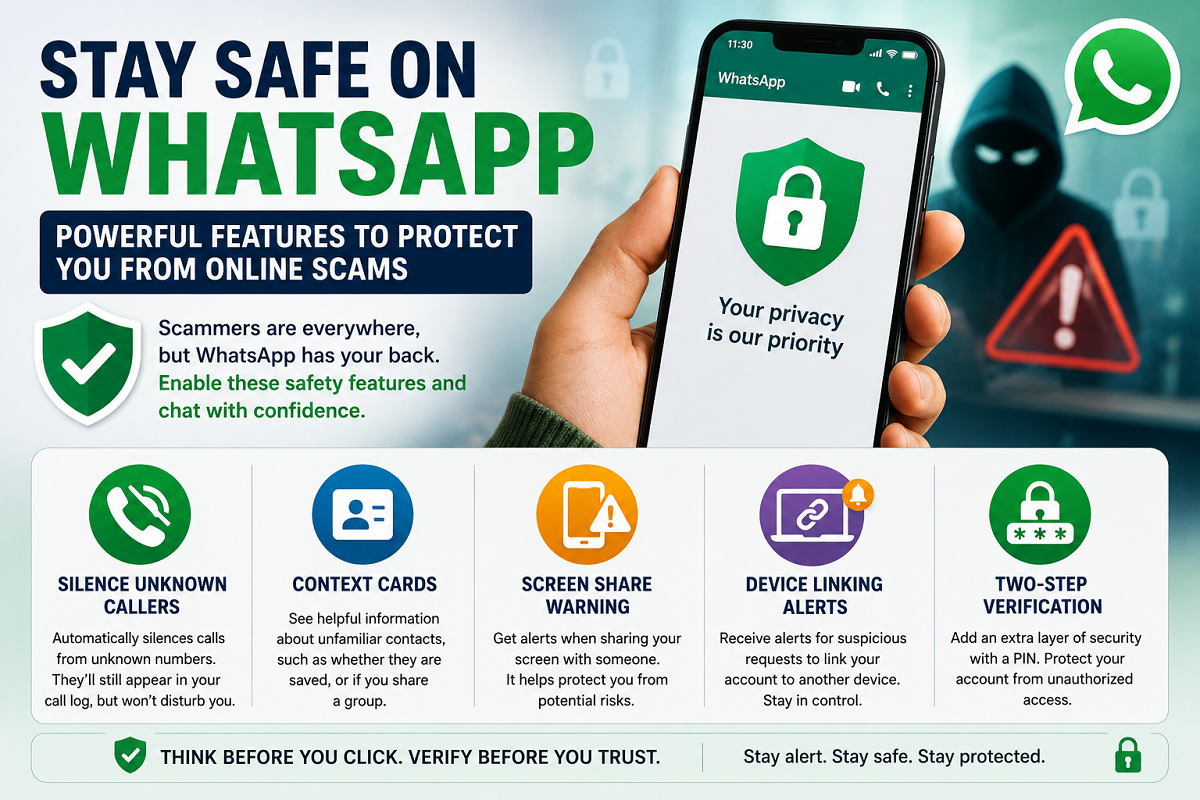
Silence Unknown Callers
One of the most useful privacy features on WhatsApp is Silence Unknown Callers.
Scam calls often originate from numbers that are not saved in your contacts. When this feature is enabled, calls from unknown numbers are automatically silenced. Although these calls will still appear in your call log and notifications, they will not ring or interrupt you.
This helps reduce unwanted disturbances while allowing users to review missed calls later if necessary.
Context Cards Provide More Information About Contacts
WhatsApp also offers Context Cards, which provide additional details about people who contact you for the first time.
These cards can indicate whether:
-
The phone number is already saved in your contacts.
-
You share a common WhatsApp group.
-
The interaction is from a completely unknown user.
This extra information helps users decide whether they should respond, ignore, report, or block the contact before engaging in a conversation.
Screen Share Warnings Help Prevent Data Theft
Screen sharing during WhatsApp video calls is a convenient feature for providing technical support or sharing presentations. However, cybercriminals sometimes misuse it to trick victims into revealing confidential information.
To address this risk, WhatsApp displays Screen Share Warnings when users attempt to share their screen, particularly with unfamiliar contacts.
The warning reminds users that screen sharing may expose sensitive information such as:
-
Banking applications
-
Passwords
-
Personal documents
-
One-time passwords (OTPs)
-
Financial details
Reading these alerts carefully before proceeding can help prevent accidental data exposure.
Device Linking Alerts
WhatsApp allows users to connect their accounts to multiple devices through the Linked Devices feature. While this offers convenience, fraudsters sometimes attempt to convince victims to link their WhatsApp account to another device, giving them unauthorized access.
To improve security, WhatsApp now provides Device Linking Alerts whenever suspicious linking attempts are detected.
If users receive an unexpected notification requesting device authorization, they should decline the request immediately unless they initiated it themselves.
Regularly reviewing the list of linked devices is also a good security practice.
Two-Step Verification Adds an Extra Layer of Protection
One of the most effective security features available on WhatsApp is Two-Step Verification.
After enabling this feature, users create a six-digit PIN that is required whenever their phone number is registered on a new device. This additional verification step helps prevent unauthorized access, even if someone manages to obtain the SMS verification code.
Enabling Two-Step Verification significantly reduces the risk of account takeover and is recommended for all WhatsApp users.
Additional Tips to Stay Safe on WhatsApp
While built-in security features offer strong protection, users should also follow basic cyber safety practices, including:
-
Never share OTPs or verification codes with anyone.
-
Avoid clicking links from unknown contacts.
-
Verify requests for money through a phone call before making payments.
-
Report and block suspicious accounts immediately.
-
Keep WhatsApp updated to access the latest security improvements.
-
Review linked devices periodically and remove any unfamiliar sessions.
Why These Features Matter
Cyber fraud continues to increase as criminals adopt new methods to target smartphone users. Although no platform can eliminate scams entirely, WhatsApp's security tools are designed to help users recognize suspicious activity before it leads to financial or personal loss.
By enabling features such as Silence Unknown Callers, Device Linking Alerts, Context Cards, Screen Share Warnings, and Two-Step Verification, users can significantly strengthen their account security and reduce the chances of falling victim to online scams.
Taking a few minutes to activate these settings today could help protect your personal information and digital identity in the future.