
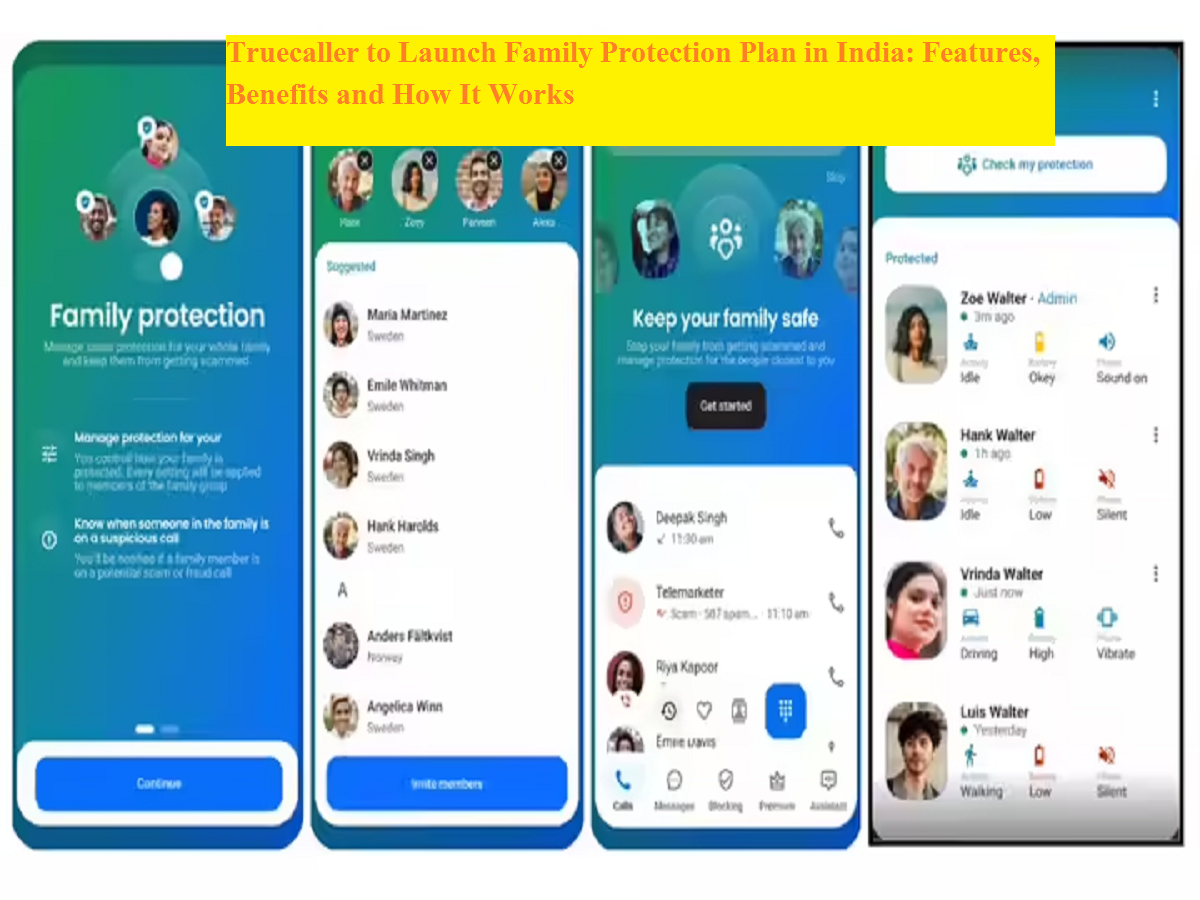
As online scams and fraudulent calls continue to rise, especially targeting senior citizens and less tech-savvy users, digital security tools are becoming increasingly important. To address this issue, Truecaller is preparing to introduce its Family Protection plan in India. The feature is expected to roll out soon and aims to help families safeguard members from spam calls, impersonation attempts, and emerging AI-based scams.
Originally launched in select global markets last year, the upcoming rollout marks an expansion of Truecaller’s effort to strengthen user safety through shared protection tools. The plan is designed to allow one tech-savvy family member to manage security settings for others, ensuring that everyone remains protected even if they are not comfortable handling app configurations themselves.
What Is the Truecaller Family Protection Plan?
The Family Protection plan is a feature within the Truecaller app that allows users to create a private group of up to five members under a single safety network. In this setup, one or more people can act as administrators, while others join as regular members.
Administrators manage essential protection settings for the group. This includes controlling spam and scam filters, adjusting protection levels, and receiving alerts if a member may be interacting with a suspicious caller. The idea is to simplify digital security by centralizing key settings rather than requiring each individual user to manage them separately.
This system can be particularly useful for families with elderly parents or children who may be more vulnerable to fraud attempts.
How a Family Group Works in the App
Creating a family group is simple and can be done directly within the Truecaller app. Once a user creates a group, they automatically become its first administrator. From there, they can invite up to four additional members to join.
Invited users remain pending until they accept the invitation. Each person can only be part of one family group at a time, ensuring clear and organized management of protection settings.
Administrators have several controls, including:
-
Promoting other members to admin roles
-
Removing participants from the group
-
Managing or dissolving the group if necessary
This flexible structure allows families to share responsibility for maintaining digital safety.
Key Features of the Family Protection Plan
The upcoming feature introduces several tools designed to help prevent scams and improve communication safety across the group.
Real-Time Scam Alerts
If a call received by a group member is identified as potentially fraudulent, administrators receive instant notifications. This enables them to respond quickly and warn the person involved.
Remote Call Ending
One of the most notable features is the ability for administrators to end a suspicious call remotely. If they believe a family member may be speaking with a scammer, they can terminate the call immediately. The user will then receive a notification explaining that the call was ended due to a possible fraud risk. This feature works on Android devices, even when Truecaller is not set as the default dialer.
Shared Protection Levels
Admins can set protection levels for the entire group, such as Off, Basic, or Max. These settings determine how strict the spam and scam filtering will be.
Shared Block List Management
Administrators can maintain a common block list that applies to all members in the group, helping prevent repeat scam calls.
Permission Monitoring
The system also allows admins to check whether important permissions—such as Caller ID access, notifications, and battery optimization settings—are enabled. This ensures that security features remain active and effective.
Free and Premium Features
Creating a family group and accessing basic protection tools, including remote call ending, will be available for free. However, some advanced features—such as maximum protection levels and expanded block list controls—will require a Premium Family subscription.
This tiered approach allows users to try core safety features before deciding whether to upgrade for additional protection.
What Information Is Shared Within the Family Group
Truecaller has clarified that only limited data is shared within a family group and that it is done with user consent. Administrators can see certain app configuration details and activity indicators on Android devices, such as:
-
Whether the phone is in use (walking or driving)
-
Battery level
-
Phone sound mode
Additionally, suspicious call alerts are shared in real time to help prevent scams. However, administrators cannot access personal call histories for normal calls, read SMS messages, or view a member’s location.
How the Feature Helps Combat Modern Scams
The launch of the Family Protection plan comes at a time when fraud tactics are becoming more sophisticated. AI-generated voice scams, impersonation attempts, and so-called digital arrest scams are increasingly targeting vulnerable individuals.
By enabling real-time alerts and remote intervention, Truecaller aims to help families respond quickly to suspicious situations. If someone is pressured during a call to share personal details or transfer money, an administrator can step in before damage occurs.
Expected Launch in India
The Family Protection plan is expected to launch in India next month, extending a feature already introduced in international markets. With digital threats evolving rapidly, tools that provide shared oversight and protection may become an important layer of safety for households.
As communication increasingly moves online, solutions like this could help families stay connected while reducing the risks associated with modern phone scams.



