TECH
DigiLocker Alert: Keep Your Driving Licence, RC and Mark Sheets on Your Phone — Here's How to Use Digital Documents
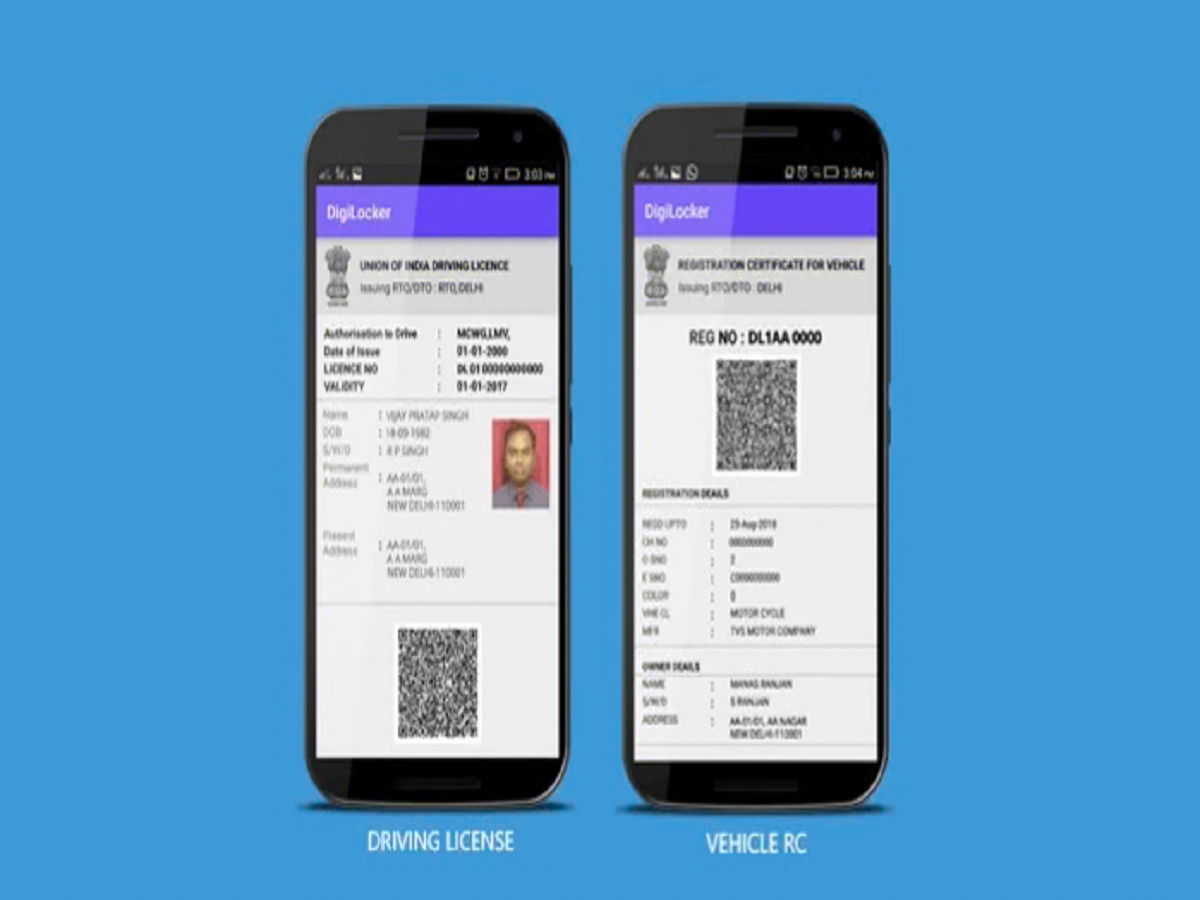
Carrying physical documents everywhere can be inconvenient, especially when you need your driving licence, vehicle registration certificate or educational certificates at short notice. The Indian government's DigiLocker platform allows users to access eligible digital documents through their smartphones, reducing the need to carry multiple paper copies.
DigiLocker is a government-backed digital document wallet operated by the Ministry of Electronics and Information Technology. It helps citizens access documents issued by participating government departments, educational institutions and other registered organisations.
Here's how you can use DigiLocker, which documents may be available and what you should know before relying on digital copies.
What Is DigiLocker and How Does It Work?
DigiLocker is an online platform that allows users to access, store and share digital documents. Depending on the issuing organisation, users can retrieve authentic documents directly from the issuer or upload their own files for personal storage.
Documents issued through DigiLocker by registered authorities are different from ordinary scanned copies uploaded by users. Issuer-provided documents can carry verification details that help establish their authenticity.
The service is available through the official DigiLocker website and mobile application.
Which Documents Can You Access Through DigiLocker?
Depending on the issuing authority and the services available for your account, DigiLocker may provide access to documents such as:
-
Driving licence issued by the relevant transport authority
-
Registration certificate (RC) for a vehicle
-
Class 10 and Class 12 marksheets
-
University degrees and academic certificates
-
Selected government-issued identity and registration documents
-
Other certificates made available by participating organisations
The availability of a document depends on whether the issuing authority has integrated the relevant service with DigiLocker.
How to Create a DigiLocker Account
Getting started is straightforward. Follow these steps:
-
Visit the official website at https://www.digilocker.gov.in/ or download the official DigiLocker app.
-
Select the option to create an account.
-
Enter the information requested during registration.
-
Complete the mobile verification process.
-
Set up your account and sign in.
-
Explore the available document categories and issuing organisations.
Some documents may require Aadhaar-based authentication or additional details for retrieval. Follow the verification instructions displayed by the official platform.
How to Download Your Driving Licence or RC
If your driving licence or vehicle registration certificate is available through DigiLocker, you can retrieve it through the platform.
First, sign in to your account and open the document search or issuer section. Select the relevant transport authority or document category, enter the required details and submit the request.
If the record is available and the details match, the document can be fetched into your account. You can then access it digitally when required.
Before travelling, make sure the document has been retrieved successfully and is accessible on your phone. Do not assume that a document will appear automatically merely because you have created a DigiLocker account.
Are DigiLocker Documents Legally Valid?
Digital documents issued through DigiLocker by authorised issuers are recognised under the applicable Indian legal and regulatory framework. The Ministry of Road Transport and Highways has also provided for acceptance of relevant electronic driving licences and vehicle registration documents through recognised digital platforms.
However, this does not mean that every image or PDF uploaded by a user has the same status as an issuer-verified document.
For official verification, retrieve the document from its issuing authority through DigiLocker whenever that option is available. Requirements can also differ depending on the document and the purpose for which it is being presented.
DigiLocker Documents Versus Uploaded Files
Understanding the difference between the two is important.
Issued documents: These are retrieved from participating authorities and can contain verification information. They are generally the preferred option when you need an official digital record.
Uploaded documents: These are files that you upload yourself, such as photographs or scanned copies. They are useful for storage, but uploading a file does not automatically make it an officially issued or verified document.
Whenever possible, use the document-fetching facility instead of relying solely on a personal scan.
What Should You Do If a Document Is Missing?
If a document does not appear in your DigiLocker account, check whether the issuing organisation is supported and whether the information entered matches its records.
You may need to use a document number, enrolment number, roll number or other details to retrieve the record. If the document is still unavailable, contact the issuing authority for assistance.
Also, keep your account credentials secure and never share your OTP with an unknown person claiming to help you retrieve a document.
Why Every Smartphone User Should Know About DigiLocker
DigiLocker can make everyday paperwork easier by bringing eligible documents together in one place. It can be useful when travelling, applying for services or accessing educational records without searching through physical files.
The most important step is to retrieve documents from their authorised issuers and ensure that they are available when needed.
To get started safely, use only the official DigiLocker website at https://www.digilocker.gov.in/ or the official application available through your device's app store.