WhatsApp Trust Warning: WhatsApp is rolling out a new security feature that encourages users to verify unknown contacts before starting a conversation. The update aims to reduce scams by displaying useful information about unfamiliar numbers before a chat begins.
WhatsApp Adds an Extra Layer of Protection
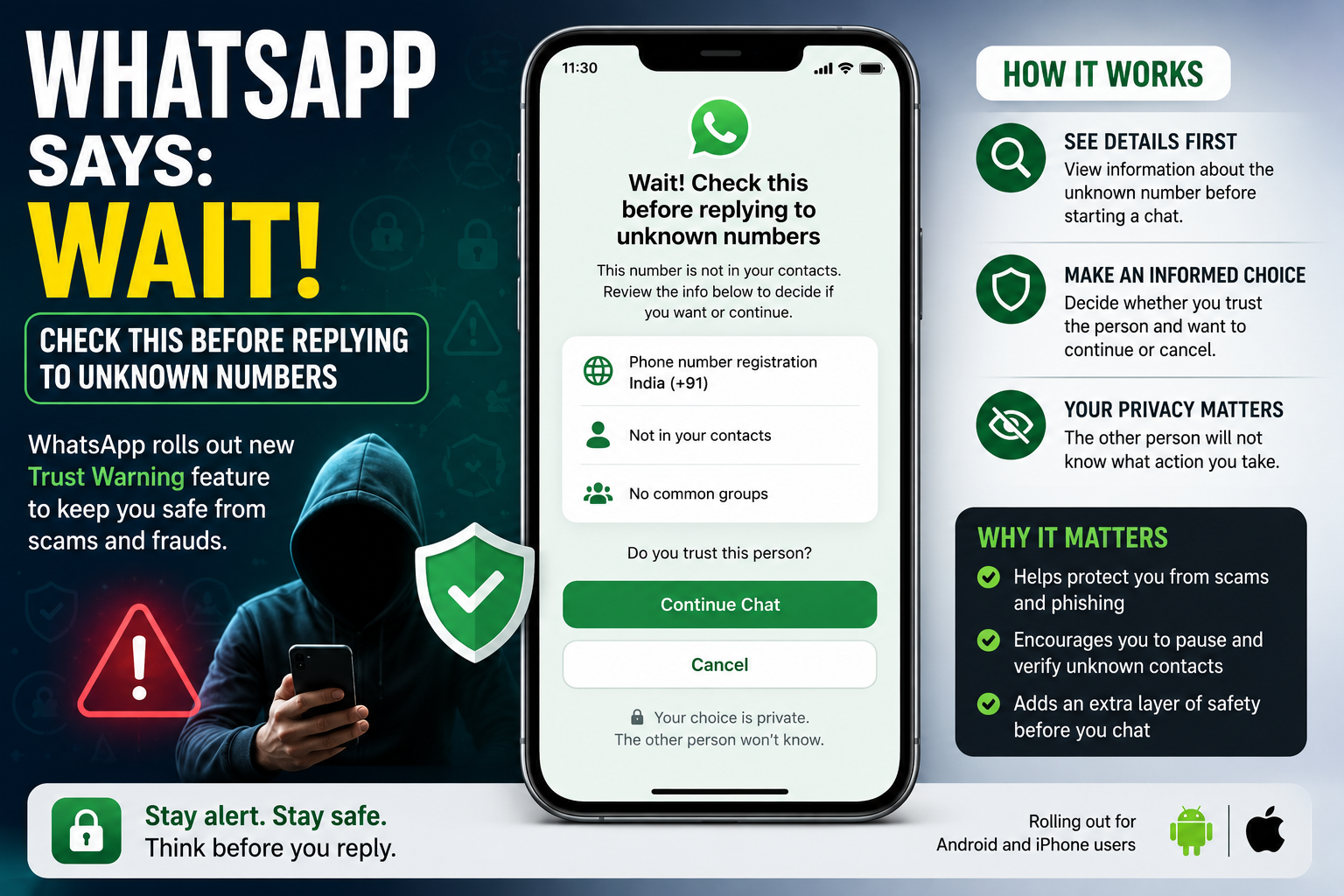
As online scams continue to rise, WhatsApp is introducing a new Trust Warning feature designed to help users avoid fraudulent conversations. Instead of opening a chat immediately with an unknown number, users will first see a safety screen providing important details about the contact.
The feature is currently being rolled out to both Android and iPhone users and is expected to reach more accounts in the coming weeks.
What Is the Trust Warning Feature?
According to reports, WhatsApp will display a warning page before users begin chatting with an unfamiliar phone number.
The screen may include information such as:
-
The country where the phone number is registered
-
Whether the number is already saved in your contacts
-
If you and the other person share any mutual WhatsApp groups
After reviewing these details, users can choose whether they trust the contact and want to continue the conversation or exit the chat.
Importantly, the unknown contact will not be notified of your decision.
Why Is WhatsApp Introducing This Update?
Cybercriminals often rely on urgency to trick victims into responding without verifying who is contacting them.
Fraudsters commonly pose as:
-
Family members
-
Friends
-
Bank representatives
-
Delivery executives
-
Recruiters offering fake jobs
-
Investment advisors promising unrealistic returns
WhatsApp's new warning aims to create a brief pause before users engage with unfamiliar contacts, giving them an opportunity to review the available information and make a safer decision.
How the Feature Can Help
The trust warning could help users identify suspicious messages before responding.
For example:
-
A person claiming to be a relative may be using a number registered in another country.
-
A supposed colleague may have no shared contacts or common WhatsApp groups.
-
An unknown number requesting urgent financial help can be verified before any reply is sent.
Although these indicators do not automatically prove that a message is fraudulent, they encourage users to exercise caution.
How It Differs From Existing WhatsApp Security Tools
WhatsApp already offers several built-in safety features, including:
-
Spam reporting
-
Block and report options
-
End-to-end encryption
-
Account verification
-
Linked-device protection
-
Scam detection measures
However, most of these protections become useful only after a conversation has already started.
The new Trust Warning works much earlier in the process by helping users evaluate unknown contacts before they interact with them.
Is It Completely Foolproof?
While the feature adds another layer of security, it cannot eliminate scams entirely.
A scammer could still use:
-
A phone number already saved in your contacts
-
A local number that appears genuine
-
A compromised account belonging to someone you know
Similarly, not every unfamiliar number is suspicious. It could simply belong to someone contacting you from a new phone or an unsaved business number.
The feature should therefore be treated as a helpful warning rather than a guarantee of safety.
Availability
WhatsApp is gradually rolling out the Trust Warning feature for both Android and iPhone users. Availability may vary by region, with wider deployment expected over the coming weeks.
Final Take
The new Trust Warning represents WhatsApp's shift toward preventing scams before conversations begin rather than responding after suspicious activity has already occurred. By displaying basic contact information and encouraging users to verify unfamiliar numbers, the messaging platform hopes to reduce impulsive responses that often lead to fraud.
Although the feature cannot stop every scam, it provides users with another useful security checkpoint before interacting with unknown contacts.