Want more privacy while chatting? WhatsApp now lets you control who can see when you’re online. Here’s a simple, fully rephrased guide to help you stay hidden.
What Does “Online Status” Mean?
On WhatsApp, your online status shows when you’re actively using the app. It appears to your contacts (and sometimes others), which can affect your privacy.
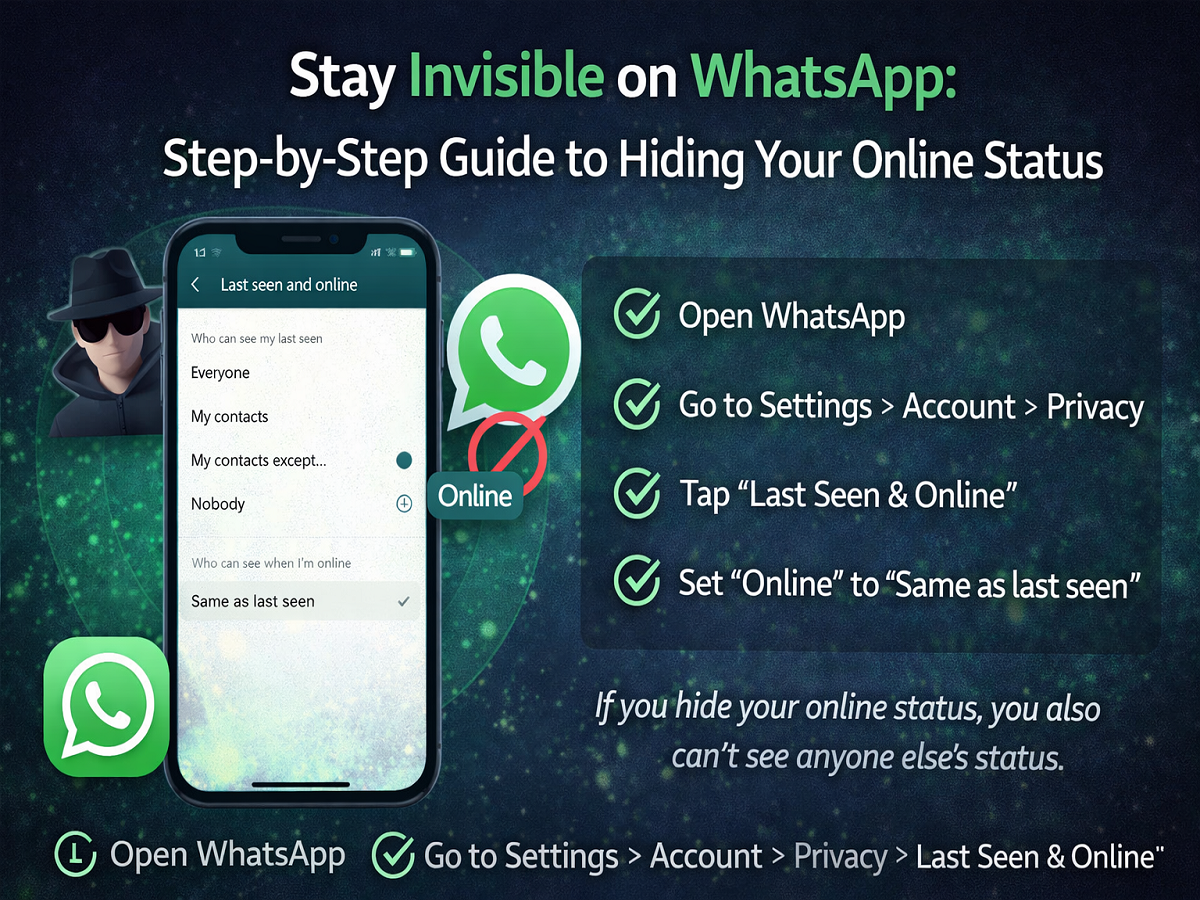
How to Hide Your WhatsApp Online Status
Follow these steps:
- Open WhatsApp
- Go to Settings
- Tap Account
- Select Privacy
- Tap Last Seen & Online
Choose Who Can See Your Status
You’ll see two important settings:
1. Who can see your Last Seen
Choose from:
- Everyone
- My Contacts
- My Contacts Except…
- Nobody
2. Who can see when you’re Online
👉 Select “Same as last seen”
This ensures your online status follows the same privacy setting.
Important Things to Know
- If you hide your online status, you won’t see others’ status either
- This rule applies to both Last Seen and Online
- Privacy works both ways on WhatsApp
Why You Should Hide Your Online Status
- Avoid pressure to reply instantly
- Protect your activity from strangers
- Maintain personal boundaries
- Improve overall digital privacy
Pro Tips for Maximum Privacy
- Combine with Profile Photo privacy settings
- Turn off Read Receipts (blue ticks)
- Limit who can see your About info
- Regularly review privacy settings
Final Takeaway
The online status control feature on WhatsApp gives you full control over your visibility. With just a few taps, you can stay connected—without letting everyone know when you’re online.
👉 A small setting change can make a big difference in your privacy!