
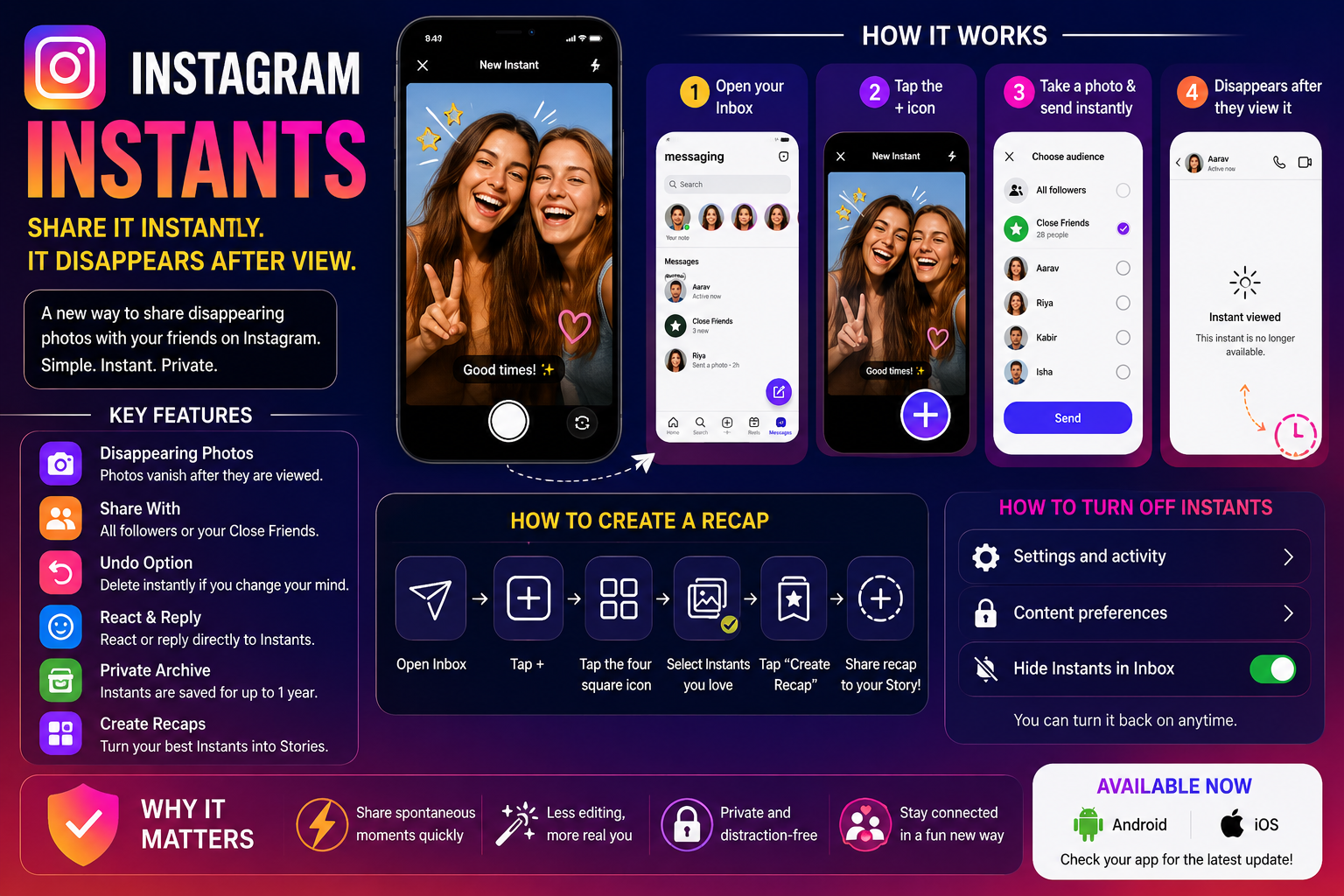
Instagram has introduced a brand-new feature called Instagram Instants, giving users another way to share quick disappearing photos with friends and followers. The feature is designed for fast, casual, and less-edited image sharing, offering an experience similar to platforms focused on temporary content sharing.
With Instagram Instants, users can instantly capture and send photos that disappear after they are viewed. The feature appears directly inside Instagram’s messaging section and focuses heavily on spontaneous sharing rather than polished content creation. Meta has also added tools such as recap generation, private archives, and instant deletion options to make the experience more interactive and flexible.
The rollout marks another major push by Meta to strengthen Instagram’s private and temporary content-sharing ecosystem.
What Exactly Is Instagram Instants?
Instagram Instants is a disappearing photo-sharing feature built directly into Instagram’s inbox system. It allows users to quickly capture an image and share it with selected followers or close friends. Once the recipient views the image, it disappears automatically from the conversation.
Unlike regular Instagram posts or Stories, Instants are designed to feel more private and immediate. Users do not need to spend time editing photos heavily before sharing them. In fact, Instagram specifically limits advanced editing tools for Instants to encourage more authentic and spontaneous interactions.
The feature closely resembles the disappearing photo-sharing style popularized by Snapchat. However, Instagram Instants currently focuses only on photos and does not support disappearing video sharing.
Key Features of Instagram Instants
Instagram Instants comes with several built-in tools and customization options that make the feature different from traditional Stories or direct messages.
Disappearing Photos
Photos shared through Instants automatically vanish after being viewed by recipients.
Minimal Editing Experience
Users can add captions, but advanced filters and heavy editing tools are restricted to maintain a more natural sharing style.
Share With Specific People
Users can choose whether they want to share Instants:
- With all followers
- Only with selected close friends
Undo Option
If someone accidentally shares an image, Instagram offers an Undo feature that immediately removes the photo from the conversation.
Reactions and Replies
Recipients can react to Instants or reply directly from the image page itself.
Private Archive
Shared Instants are stored privately inside an archive for up to one year. Users can later access this archive to create recap content.
Recap Creation Tool
Instagram also lets users create recap collections using previously shared Instants and publish them directly to Stories.
How to Share Photos Using Instagram Instants
Posting an Instant photo is designed to be fast and simple.
Steps to Post Instagram Instants
- Open the Instagram app on your smartphone.
- Swipe to open your inbox or tap the Messages button.
- Tap the Plus (+) icon located in the bottom-right corner.
- The Instant camera interface will open automatically.
- Capture a photo instantly.
- Choose who you want to share it with.
- Send the Instant photo directly.
If you later decide to remove the image, you can visit the “Your Instants” section and delete it manually.
How to Create an Instagram Instants Recap
Instagram allows users to combine old Instants into recap collections that can later be posted to Stories.
Steps to Make an Instants Recap
- Open Instagram and go to your inbox.
- Tap the Plus (+) icon or open the Instants page.
- Access the “Your Instants” section.
- Tap the four-square icon located at the top-right corner.
- Select the Instants you want to include.
- Tap “Create Recap.”
- Share the recap directly to your Instagram Story.
This feature allows users to revisit temporary moments and turn them into story-style highlights later.
Can You Turn Off Instagram Instants?
Yes. Instagram gives users full control over whether they want to see Instants inside their inbox.
Steps to Disable Instagram Instants
- Open Instagram and visit your profile page.
- Tap the three horizontal lines in the top-right corner.
- Open “Settings and activity.”
- Scroll to the “What you see” section.
- Tap “Content preferences.”
- Enable the “Hide Instants in Inbox” option.
Users can re-enable the feature anytime by following the same steps again.
Is Instagram Instants Available in India?
Yes. Instagram Instants is currently rolling out in India for both Android and iPhone users. The feature is available directly through the Instagram mobile application and does not require any additional payment or subscription.
Why Instagram Instants Matters
The launch of Instants shows how social media platforms are increasingly focusing on temporary and private sharing experiences rather than permanent public posts. Many younger users now prefer casual interactions over highly polished social media uploads.
By introducing disappearing photo-sharing with limited editing tools, Instagram is trying to encourage more authentic communication between users while also competing more directly with Snapchat-style messaging features.
For users who enjoy quick and casual photo sharing without the pressure of permanent posts, Instagram Instants could become one of the platform’s most frequently used communication tools in the coming months.



