TECH
ClickFix Scam in the name of Cloudflare Verification: Computer can be hacked with one click, here's how to avoid it
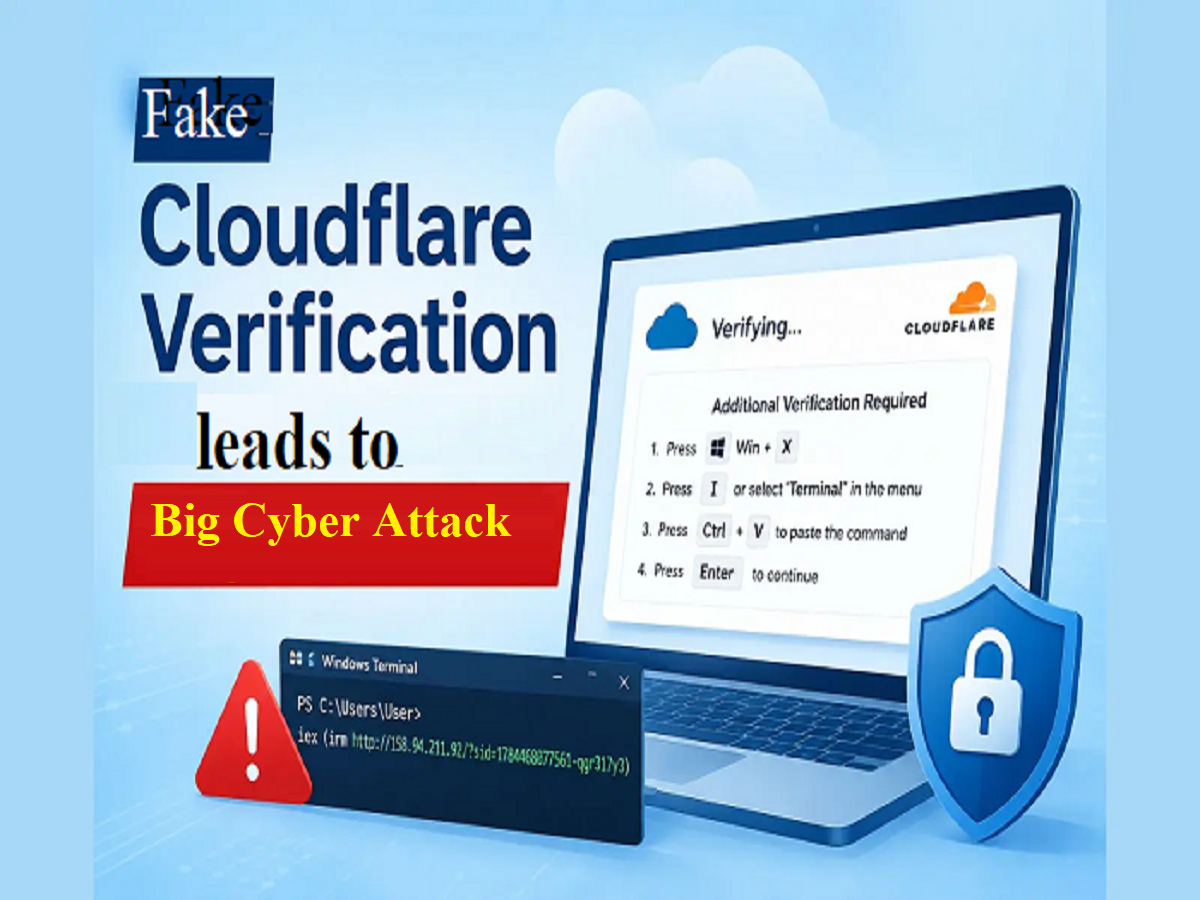
Clickfix attacks trick users into executing PowerShell commands using fake security verification. Learn why commands like irm and iex are dangerous and how to identify suspicious pages.
Cybercriminals are now forcing users to run malicious commands on their computers instead of directly downloading malware. This technique, called ClickFix, uses the credentials of a legitimate website and a trusted security service like Cloudflare to show the user a fake verification process. They are then asked to paste a command into Windows Terminal or PowerShell to complete the verification.
A similar ClickFix attack pattern was discovered in an earlier Proof of Concept (PoC) linked to Nilesat's website. In this example, the page displayed on the website was designed to resemble Cloudflare's security verification process, but to complete the verification, the user was asked to open Windows Terminal and manually execute a command instead of performing a normal action in the browser.
However, it's important to clarify that this is an old PoC example related to Nilesat , and the website has since been patched. The purpose of this report is not to question Nilesat's current security posture, but rather to illustrate how social-engineering techniques like ClickFix can work.
What was the user made to do in the name of Cloudflare Verification?
The old PoC prompted the user to follow a series of steps on a fake verification page. These included opening Terminal using a Windows shortcut, pasting a given PowerShell command, and then pressing Enter.
The key to this entire process was to convince the user that they were completing a security verification. In reality, they were being made to execute a PowerShell command on their own system.
This is the most dangerous part of a ClickFix attack. The attacker doesn't necessarily exploit a software vulnerability. Instead, they convince the user to take an action that allows the malicious code to execute on the user's system.
The real danger was hidden in the PowerShell command
The commands used in the old PoC included PowerShell commands irm and similar commands.iex
irm, i.e. Invoke-RestMethod, was used to retrieve content from a remote server, while iex, i.e. Invoke-Expression, could execute the retrieved content via PowerShell.
This means that the user doesn't need to see the entire malicious payload already inside the command. The command can retrieve content from an external server and then send it to the system for execution.
This behavior is particularly risky from a security perspective, as the content on the remote server may be changed later. Therefore, simply looking at the command isn't always sufficient to predict its final behavior.
Payload could be downloaded using a remote server
In this old PoC, the PowerShell command was configured to receive content from an external IP address.
The remote host that appeared in the PoC was:
This was not part of the normal Cloudflare verification infrastructure. Available VirusTotal analysis found URLs associated with this endpoint were associated with malicious, phishing, or malware-related activity by multiple security vendors.
This is why any attempt by a verification page to download PowerShell content from an unknown IP address or external server should be considered a serious warning sign.
Why is the name Cloudflare used?
In ClickFix attacks , user trust is often more important than technical exploitation .
Cloudflare is a well-known name, and users have already seen its security checks on many websites. Attackers can take advantage of this familiarity to create a fake verification interface.
The user thinks they're completing a website's security verification, but after a few steps, they're prompted to open a terminal, paste a command, or execute a script.
This is where the normal verification process turns into a potential social-engineering attack.
No need to open Terminal in genuine Cloudflare Verification
This is the most important thing that users should remember.
During a typical Cloudflare verification, you will:
- There is no need to open Windows Terminal by pressing Windows + X.
- There is no need to manually paste PowerShell commands.
- There is no need to execute any unknown command by pressing Enter.
- There is no need to download a script from a remote server and run it manually.
If any website asks you to follow such steps in the name of Cloudflare verification, then it should be considered a serious security warning .
Necessary clarification regarding the old PoC of Nilesat
This example related to Nilesat is from an older PoC and the website has since been fixed.
Therefore, this case should not be seen as a report on the current security situation at Nilesat. Its significance lies in the fact that it provides an example of how to understand a technique like ClickFix using the credentials of a genuine-looking website and trusted security brand.
In such attacks, the compromised website may only be a delivery mechanism, while the ultimate goal is to get the user to perform a malicious action.
How can users avoid ClickFix Attack?
If during verification on a website you are asked to open Windows Terminal or PowerShell and copy-paste a command and press Enter, then do not do so at all .
In particular powershell, unknown commands containing commands like , iex and , irm should not be executed without checking. Similarly, commands that download content from an unknown IP address or unfamiliar domain can also be a sign of potential danger.
The most important thing is that you should not consider any page legitimate just by looking at the Cloudflare logo, name or verification-like interface.
If a website is asking you to run a command on your computer in the name of verification, then it may not be a normal security verification but a potential ClickFix attack .
Note: This PoC and all the IPs, technical demos and attack procedures displayed in it have been demonstrated by Cyber Security Researcher Santosh Kumar for research and awareness purposes.