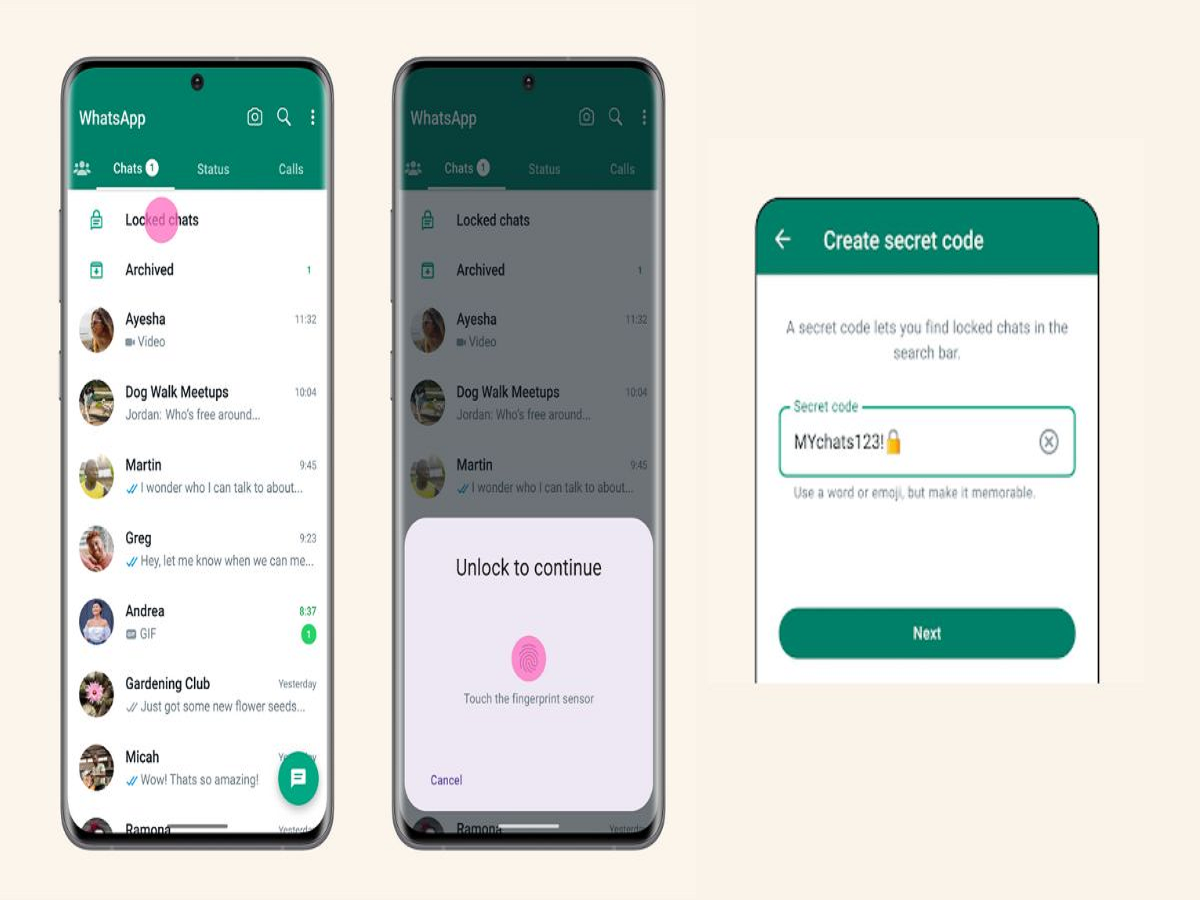
WhatsApp has several privacy features that can help users keep personal conversations away from prying eyes. One of the most useful is the ability to lock chats and hide the locked-chat folder using a secret code.
This means that even if someone gets access to your unlocked WhatsApp, your most private conversations can remain hidden from the normal chat list. WhatsApp's official Help Center confirms that hidden locked chats can be accessed by entering the secret code in the search bar.
What is the Secret Code feature?
WhatsApp's Chat Lock moves selected conversations into a protected folder that can only be opened using your device authentication or the additional security method available for locked chats.
WhatsApp later added the ability to hide the Locked Chats folder completely. Once hidden, the folder doesn't remain visible in your regular chat list.
This can be useful if you occasionally hand your phone to family members or friends.
How to lock a WhatsApp chat
To protect an individual conversation:
Open WhatsApp.
Open the chat you want to protect.
Tap the person's or group's name at the top.
Select the Chat Lock option.
Confirm using your fingerprint, Face ID or device authentication.
The conversation will then be moved into the Locked Chats section, and details from that chat are also hidden from notifications.
How to hide the Locked Chats folder
After locking your chats, you can make the folder itself harder to find.
Go to your Locked Chats settings and enable the option to hide locked chats. WhatsApp allows users to set a secret code that can be used to reveal hidden locked conversations.
Once the folder is hidden, you can find the protected chats by tapping the WhatsApp search bar and entering your secret code.
Choose a secret code carefully
Don't use an obvious code such as your birthday, phone number or "1234."
Ideally, choose something that is difficult for other people who know you to guess. Also remember that if you forget the secret code, WhatsApp warns that there are limitations around recovering access to hidden locked chats.
Another WhatsApp security feature you should turn on
WhatsApp has also introduced Strict Account Settings for users who may face sophisticated cyberattacks.
The feature can automatically block attachments and media from unknown senders, silence calls from people you don't know and restrict certain settings to provide stronger protection.
For most people, this may not be necessary, but it can be useful for users who believe they could be targeted by sophisticated attacks.
Be careful about WhatsApp device-linking scams
Another important security feature introduced by WhatsApp is a warning system for suspicious device-linking attempts.
Scammers may try to convince you to share a WhatsApp linking code or scan a QR code, which can allow their device to be connected to your account. WhatsApp now warns users when its systems detect potentially suspicious linking behaviour.
Never share your WhatsApp verification or device-linking codes with someone who contacts you unexpectedly.
WhatsApp is adding more privacy features
WhatsApp is also working on usernames that will allow people to connect without necessarily revealing their phone number when contacting someone for the first time. Users can already reserve a username through Settings → Account → Username, although availability of the full feature is being rolled out gradually.