TECH
WhatsApp Adds Adobe Acrobat Integration: Open and Edit PDF Files Directly in Chats Without Downloading
New Feature Lets Users View, Annotate, and Manage PDF Documents Inside WhatsApp Web and Windows App
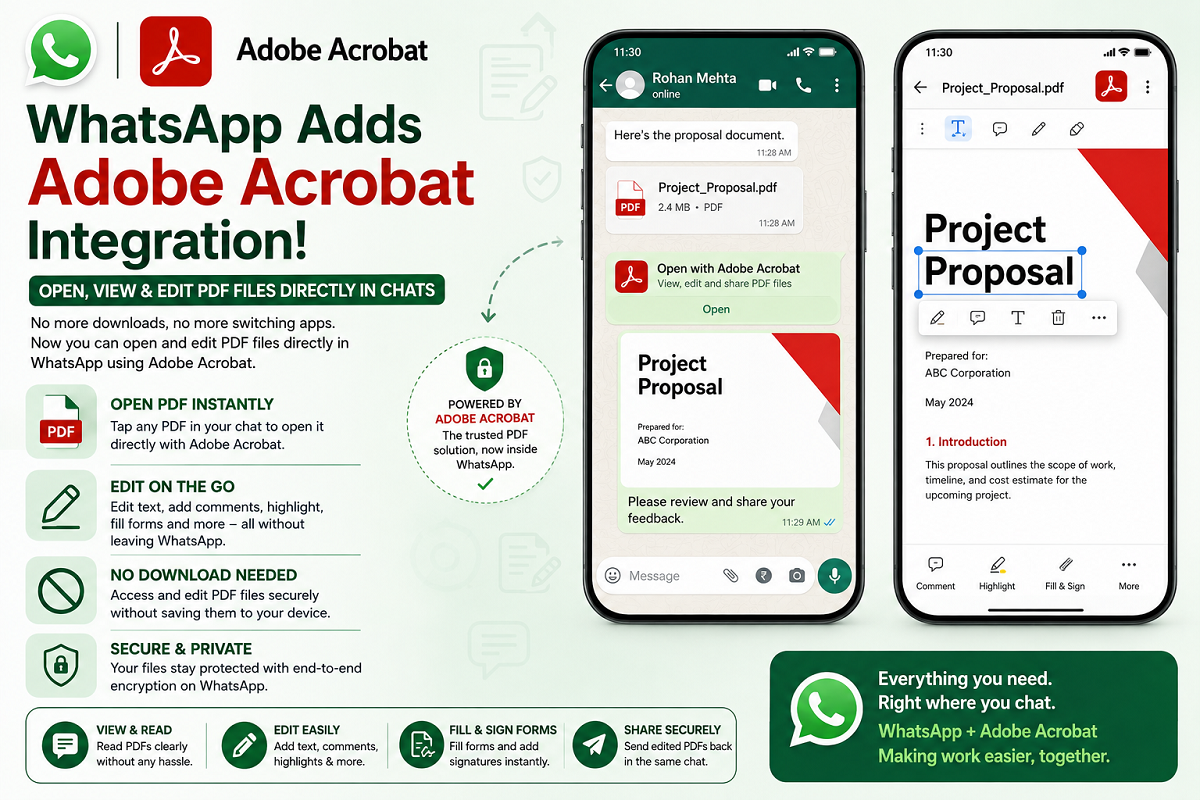
WhatsApp has introduced a major productivity upgrade by integrating Adobe Acrobat into its platform, allowing users to open, view, and make basic edits to PDF files directly within WhatsApp. The new feature eliminates the need to download PDF documents or switch to a separate application before reading or annotating them.
The update is currently available for WhatsApp Web and the WhatsApp Windows application, making it easier for users, professionals, and businesses to handle documents while staying inside the chat window.
What Is the New Adobe Acrobat Integration?
With the latest integration, WhatsApp users can access PDF files directly from a conversation without first saving them to their device. Once a document is opened, it can be viewed within the chat interface using Adobe Acrobat's built-in document tools.
Previously, opening a PDF required downloading the file and launching another application. The new feature streamlines the process by keeping everything inside WhatsApp.
What Can Users Do With PDF Files?
The integration offers more than just document viewing. Users can also perform several basic editing and annotation tasks without leaving the chat.
Supported actions include:
-
Open PDF files instantly from a chat.
-
Read documents without downloading them.
-
Scroll through multiple pages.
-
Zoom in and out for better readability.
-
Highlight important text.
-
Underline selected content.
-
Strike through text where needed.
-
Draw or add simple annotations.
-
Continue advanced editing using Edit in Acrobat.
These tools make reviewing contracts, reports, invoices, and study materials significantly more convenient.
No Need to Leave WhatsApp
One of the biggest advantages of the feature is that users no longer need to switch between multiple applications while working with PDF documents.
Everything—from opening the file to making quick annotations—can be completed inside WhatsApp Web or the Windows desktop app, helping improve productivity and reduce workflow interruptions.
Helpful for Businesses and Professionals
The feature is expected to be especially useful for businesses that regularly exchange PDF documents with clients, partners, or employees.
Potential use cases include:
-
Reviewing invoices.
-
Checking contracts.
-
Reading business proposals.
-
Approving reports.
-
Sharing educational documents.
-
Collaborating on project files.
Because documents can be viewed on a larger computer screen, users may find it easier to review detailed content compared to viewing PDFs on a mobile device.
Security Remains a Priority
WhatsApp has stated that the new PDF experience continues to benefit from the platform's end-to-end encryption, helping protect documents shared between users.
Additionally, password-protected PDF files supported by Adobe Acrobat retain their security features, adding another layer of protection for sensitive information.
This means users can work with confidential documents while maintaining the security standards expected from both WhatsApp and Adobe Acrobat.
Available Globally
The Adobe Acrobat integration has been rolled out globally for WhatsApp Web and the Windows desktop application. Users in India and several other regions have already started receiving the feature.
If the option is not yet visible, users are advised to update WhatsApp Web or the Windows application to the latest version, as the rollout may continue in phases.
Why This Update Matters
PDF documents are widely used for business communication, education, government paperwork, and personal record-keeping. By bringing Adobe Acrobat directly into WhatsApp, the messaging platform reduces the time spent switching between applications and makes document collaboration much more efficient.
The feature also strengthens WhatsApp's position as more than just a messaging service by expanding its productivity capabilities for desktop users.
Final Take
The integration of Adobe Acrobat with WhatsApp Web and the Windows app marks a significant improvement for users who frequently work with PDF documents. Instead of downloading files or opening separate software, users can now view, scroll, zoom, highlight, underline, annotate, and access additional editing tools directly inside WhatsApp.
Combined with end-to-end encryption and Acrobat's document management capabilities, the update offers a more convenient and secure way to review and collaborate on PDF files, making everyday communication and document handling faster and more efficient.