BUSINESS
AEPS Scam Aadhaar Setting: Accounts are being emptied without card-OTP, avoid AEPS scam by changing Aadhaar settings

Aadhaar Biometric Lock: Through the AEPS scam, online scammers have devised a way to empty bank accounts without a card or OTP. To avoid this, it's important to download the Aadhaar app on your phone and lock your biometrics. This will prevent your biometrics from being misused in scams.
Aadhaar Safety Settings: Online fraudsters are constantly looking for new ways to defraud people. One new method of fraud is the AEPS scam. In this scheme, anyone's bank account can be emptied without the need for their card or an OTP. In fact, online fraudsters use the special AEPS (Aadhaar Enabled Payment Service) provided by the NPCI. This service doesn't require a card or OTP for banking transactions. Money can be transferred from one account to another using just your Aadhaar number and biometrics.
Scammers only need your Aadhaar number and a clear photo from social media to carry out the AEPS scam. Using your photo, a deepfake video is created using AI, which is then used to empty your account through face verification.
There are several ways to avoid this scam, and the most important one is to keep your Aadhaar biometrics locked. This makes it virtually impossible to use your biometrics to scam you. This setting also prevents misuse of your Aadhaar.
How does the AEPS scam happen?
To carry out this scam, a service of NPCI is misused. This service is offered for banking without card or OTP. Your Aadhaar and biometrics are used in this. Online scammers have made this their weapon for fraud.
In this, deepfake video is created from your photo through AI, which passes face authentication. Apart from this, bank accounts are targeted by finding out the Aadhaar number. To avoid this, it is important that you tighten some settings. Indian Cyber Crime Coordination Centre has also given information about this by posting on X recently.
Two government tips to avoid AEPS scam
The Indian Cyber Crime Coordination Centre has provided two tips to avoid AEPS scams on X. According to them:
If you don't use the AEPS service, call your bank and have it disabled for your account. This eliminates the possibility of fraud.
If you do use the service, you can lock your Aadhaar biometric data. Whenever necessary, unlock your biometric data from the Aadhaar app and lock it back once you're done. This can help protect you from AEPS scams.
I4C Recommended
Part 1 mein aapne dekha ki AEPS face authentication fraud ke through bina OTP aur card ke bhi bank account se paise nikale ja sakte hain
— CyberDost I4C (@Cyberdost) April 28, 2026
Ab sawal hai - iss scam se bachna kaise hai?
Yeh 2 steps turant follow karein 👇
1. Aadhaar Lock karein (mAadhaar app)
Jab Aadhaar locked… pic.twitter.com/gwtyQccOI6
How to lock Aadhaar biometric data?
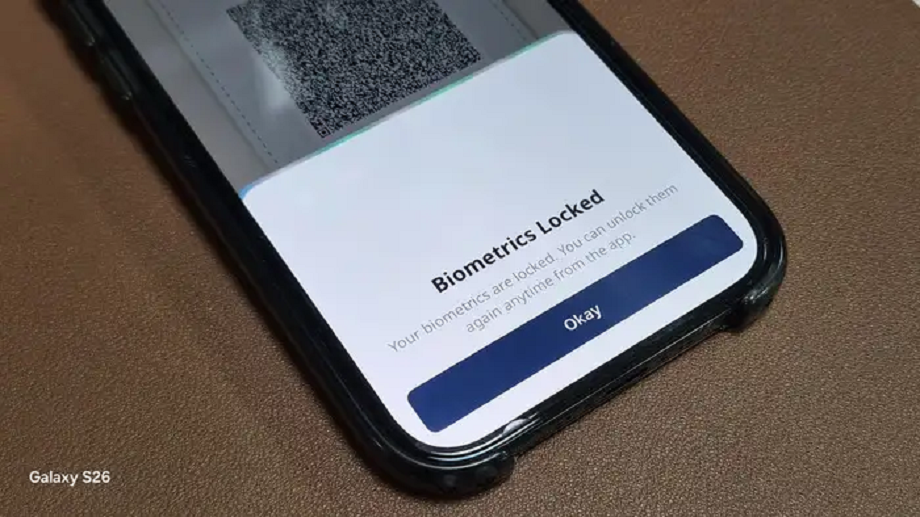
- To lock your Aadhaar biometric data, install the new UIDAI Aadhaar app on your phone. Then, log in to the app using your Aadhaar number.
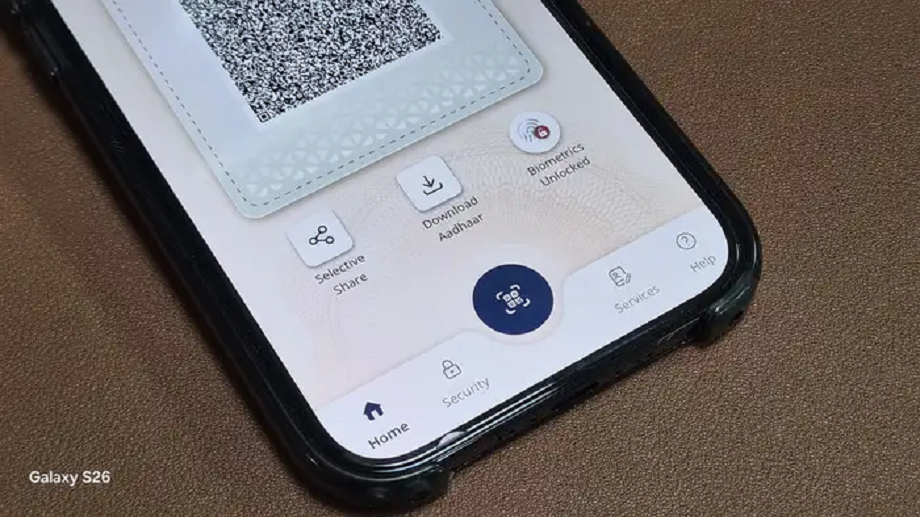
- Click on Biometrics Unlocked below the Aadhaar QR code on the home screen of the app .
- After this click on Yes, Lock Biometrics.
- A notification saying Biometrics Locked will pop up on your screen.
Now you will be able to see an option named Biometrics Locked below the QR code on the home screen of the app.
How to unlock biometric lock?
- If you need to unlock the biometric lock, you can do so by following the steps mentioned above and reaching the home page of the app.
- After this click on Biometrics Locked icon.
- Click on Yes, Unlock Biometrics.
- Immediately after this, a pop-up of Biometrics Unlocked will appear on your screen.
PC:NBT